Designing a B2B Payment & Invoicing Experience (confidential)
Foundational workflow design in an early-stage SaaS startup.

Selected visuals and details have been simplified or adapted to respect confidentiality
INTRODUCTION
I joined an early-stage B2B SaaS startup during MVP definition, contributing to the foundational workflows that enable businesses to set up accounts, configure payments, manage customers, and generate invoices.
MY ROLE
As the UX designer responsible for core product workflows, I structured the platform’s end-to-end operational systems to support scalable MVP development.
My work spanned:
Business profile setup
Payment method configuration
Customer management
Invoice generation
Dashboard structure
Name check and domain registration exploration
[Project Scope]
Founder + 5 engineers + 1 UX
[Role]
UX Designer . Core Product Workflows
[Timeline]
November 2025 - present
INTRODUCTION
I joined an early-stage B2B SaaS startup during MVP definition, contributing to the foundational workflows that enable businesses to set up accounts, configure payments, manage customers, and generate invoices.
PRODUCT CONTEXT
Designing Across the Business Lifecycle
This product was designed to support businsses from day one, starting from setting up their online presence to managing ongoing operations.Rather than focusing on a single feature, the product experience was designed as an interconnected system supporting both initial setup and long-term retention.
My work contributed across these core systems; however, due to confidentiality considerations, the following sections focus on the invoice generation workflow as a representative example.
Case study focus
Acquisition
Establish Presence
Identity validation
Online presence setup
Retention
Manage Ongoing Operations
Payment Setup
Customer Management
Account setup
Invoice Generation
Dashboard
PRODUCT CONTEXT
Designing Across the Business Lifecycle
This product was designed to support businsses from day one, starting from setting up their online presence to managing ongoing operations.Rather than focusing on a single feature, the product experience was designed as an interconnected system supporting both initial setup and long-term retention.
My work contributed across these core systems; however, due to confidentiality considerations, the following sections focus on the invoice generation workflow as a representative example.
Case study focus
Retention
Manage Ongoing Operations
Payment Setup
Customer Management
Account setup
Invoice Generation
Dashboard
Acquisition
Establish Presence
Identity validation
Online presence setup
Retention
Manage Ongoing Operations
Payment Setup
Customer Management
Account setup
Dashboard
Invoice Generation
Case study focus
PRODUCT CONTEXT
Designing Across the Business Lifecycle
This product was designed to support businsses from day one, starting from setting up their online presence to managing ongoing operations. Rather than focusing on a single feature, the product experience was designed as an interconnected system supporting both initial setup and long-term retention.
My work contributed across these core systems; however, due to confidentiality considerations, the following sections focus on the invoice generation workflow as a representative example.
Case study focus
Hook
Establish Online Presence
Identity validation
Online presence setup
Retention
Manage Ongoing Operations
Payment Setup
Customer Management
Account setup
Invoice Generation
Dashboard
The challenge
Designing an invoice workflow that remains intuitive across devices while operating within real-world constraints.
Although invoice creation seems straightforward, the workflow requires handling dynamic form states, multiple line items, and flexible payment terms. As users entered information, parts of the form would shift and update, adding layers of complexity beneath what needed to feel like a simple task.
Because the experience is within a long, multi-step form, there was a real risk of overwhelm before completion. The challenge was to structure the information in a way that felt guided and manageable, while still supporting efficiency, edge cases, and consistent performance across desktop and mobile.
Structuring the Experience
Refining the workflow
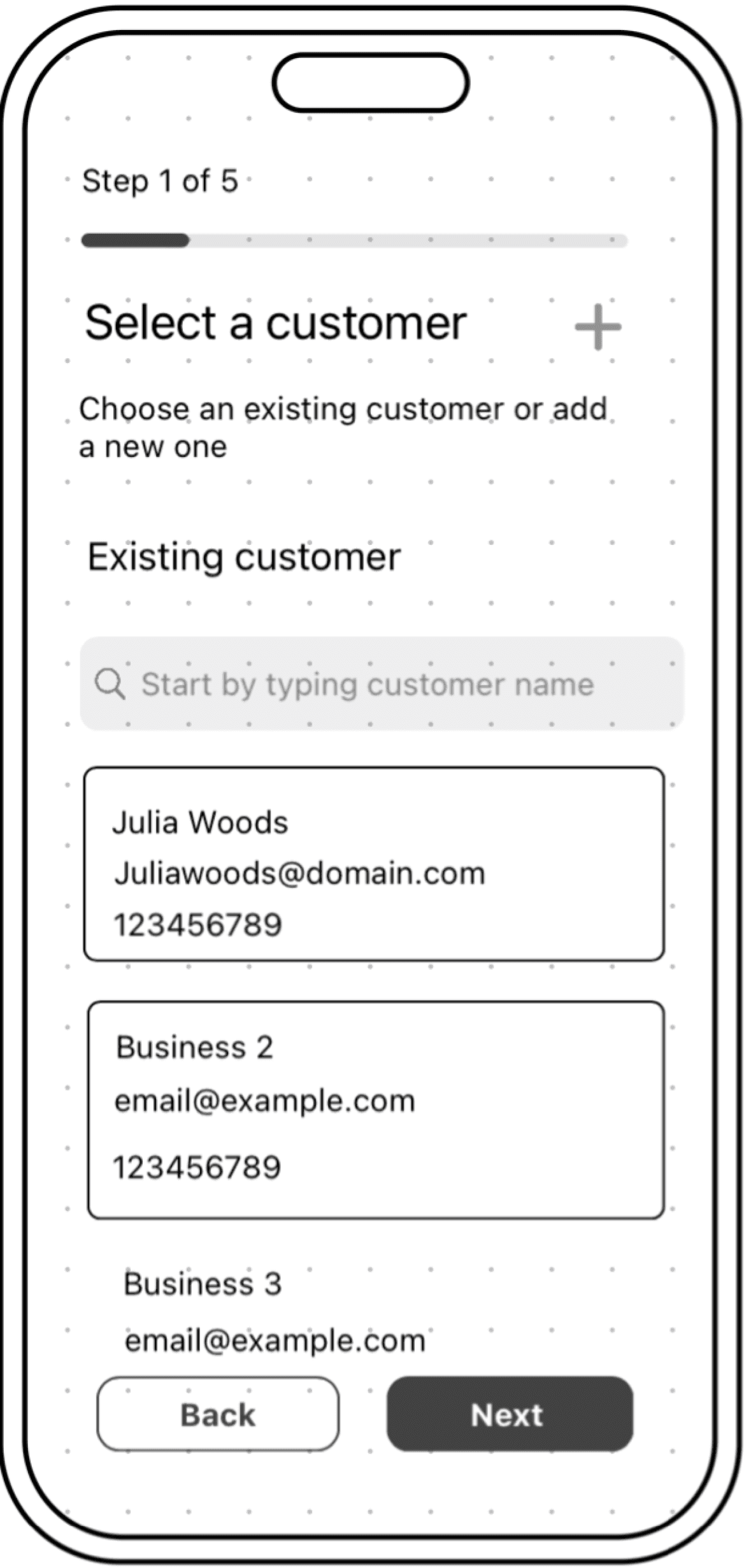
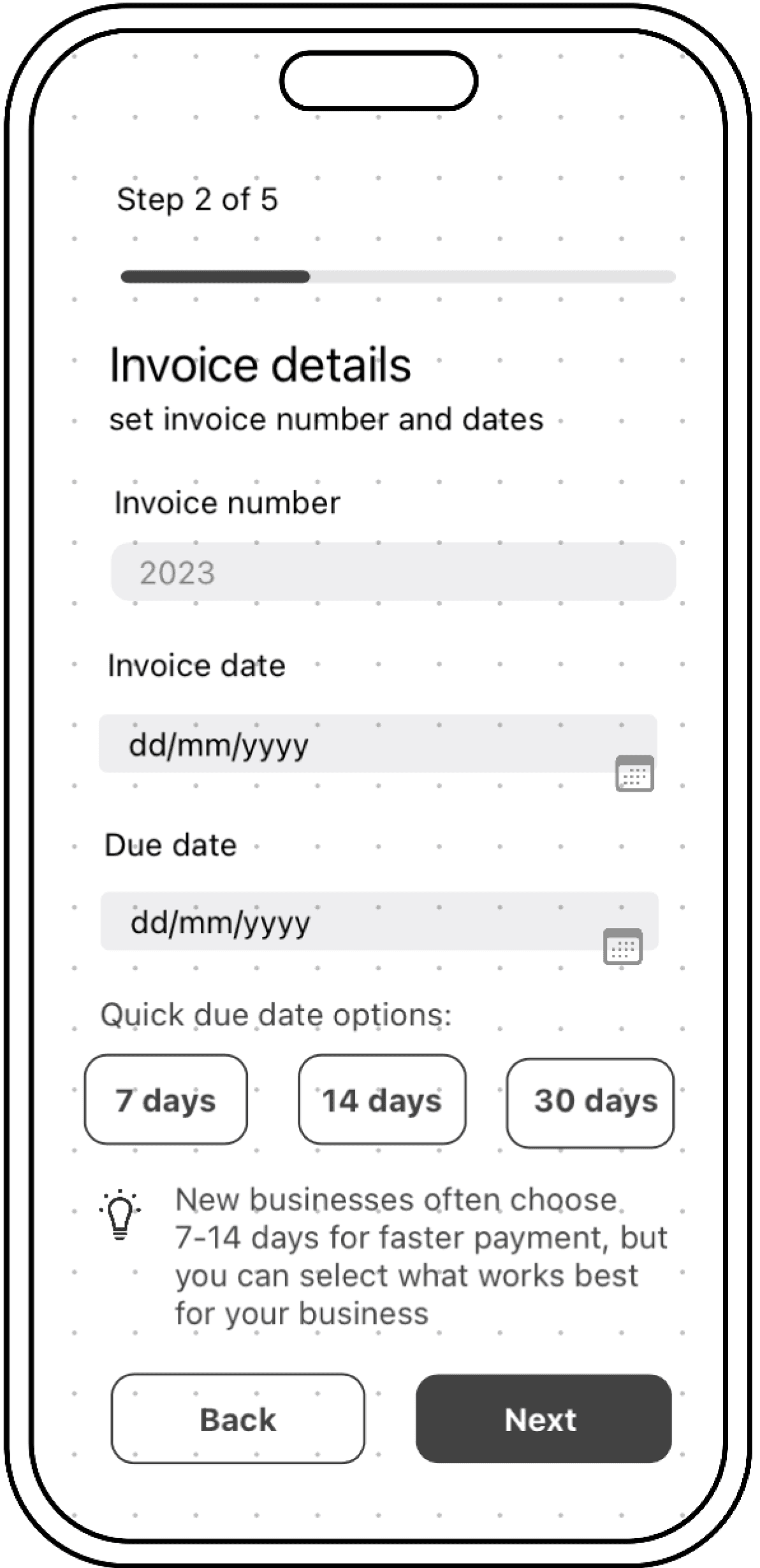
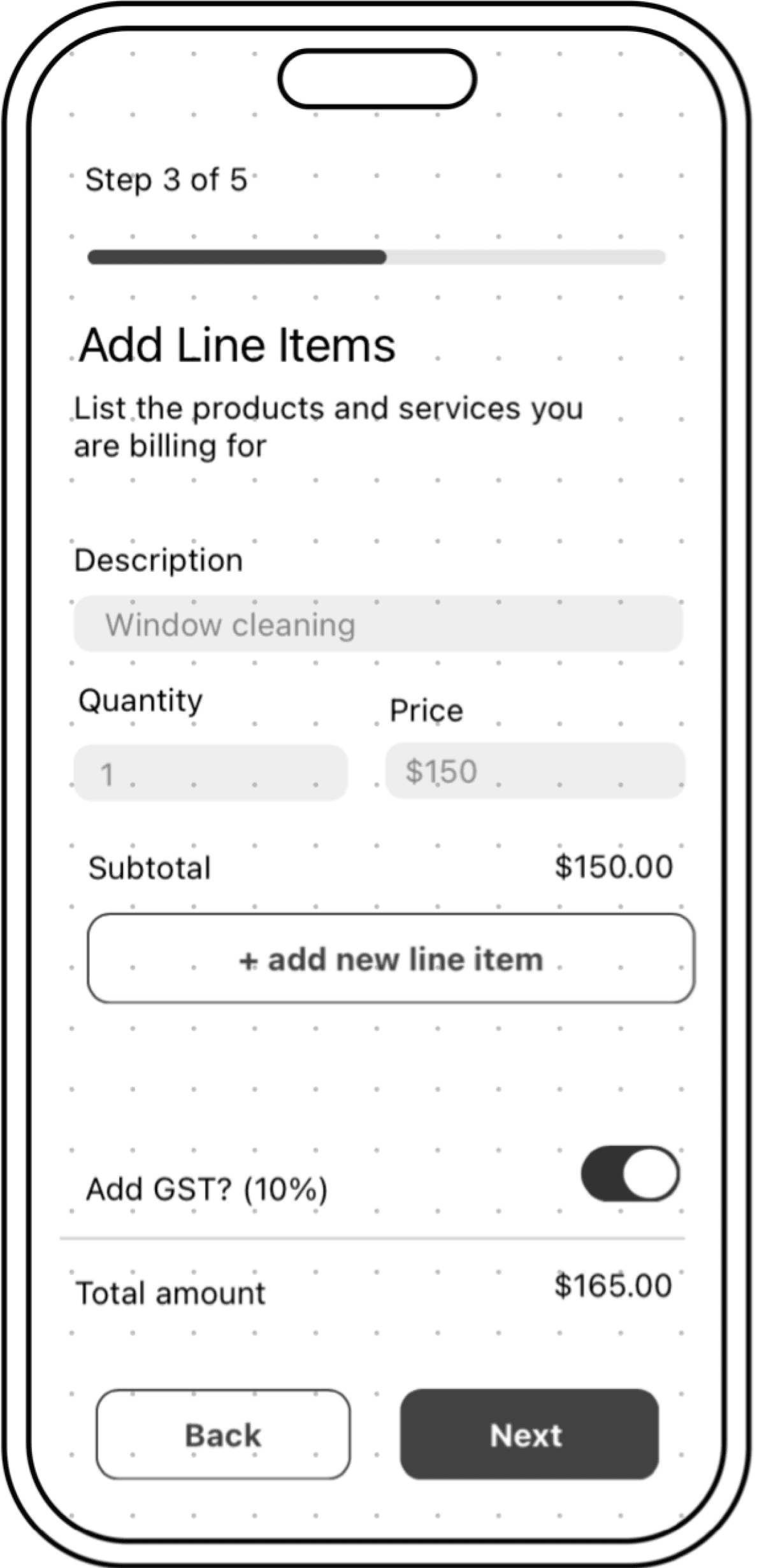
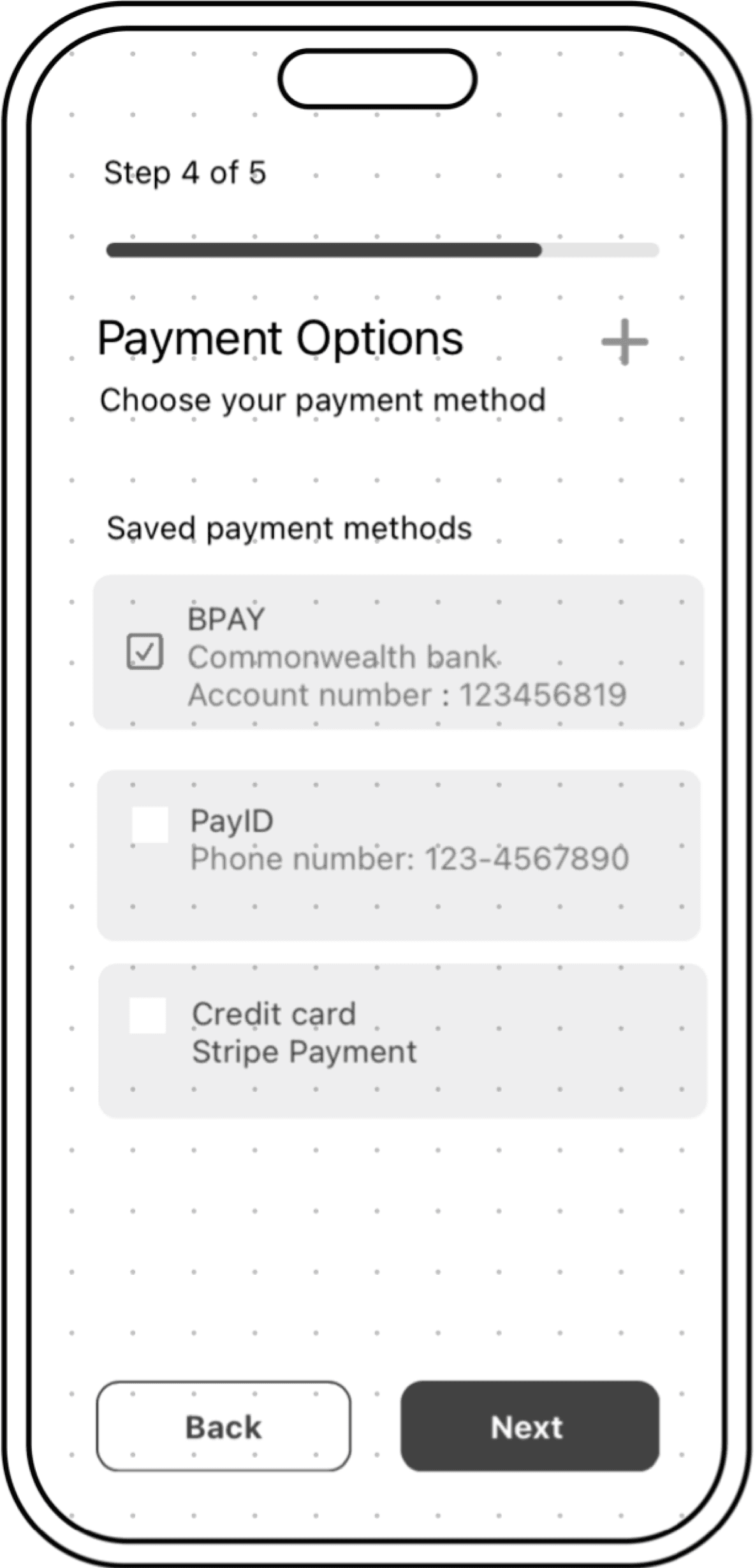
When I joined the team, the invoice flow had already been structured into five steps:
Select customer
Invoice details
Add invoice items
Select payment
Invoice preview
Structuring the Experience
Refining the workflow
When I joined the team, the invoice flow had already been structured into five steps:
Select customer
Invoice details
Add invoice items
Select payment
Invoice preview
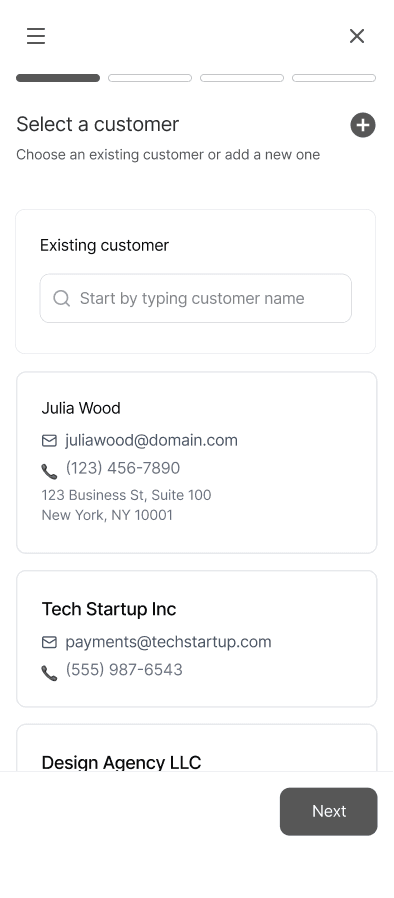
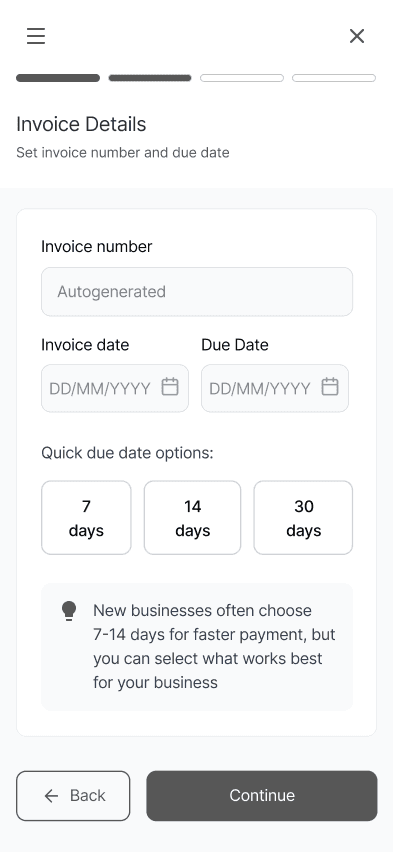
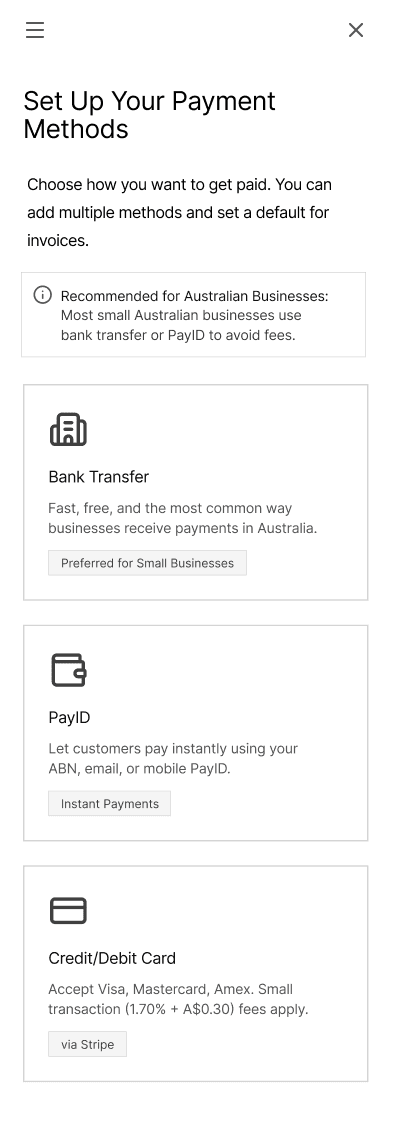
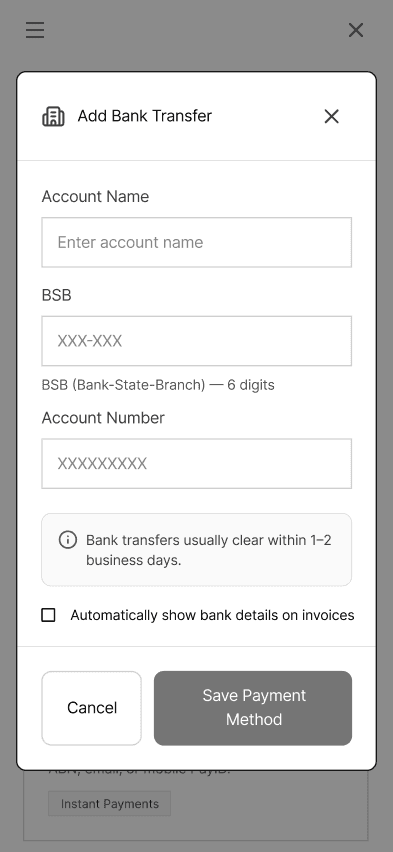
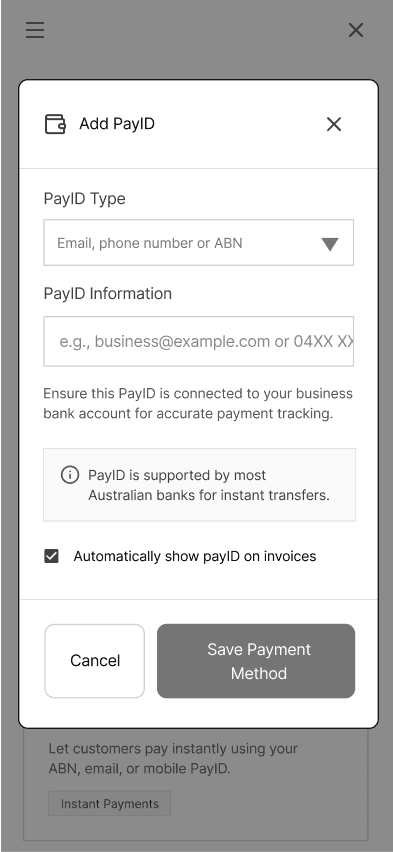
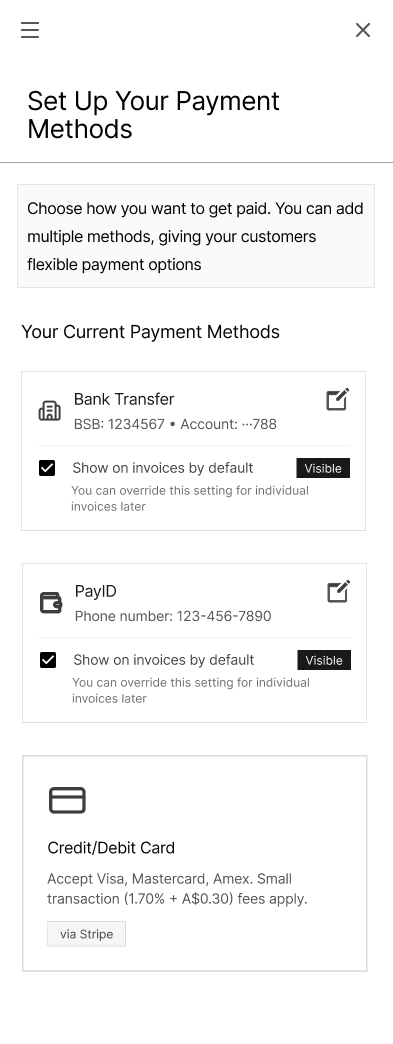
While each step of the invoice generator felt organised, I identified that separating payment selection into its own step was unnecessary within this flow. I suggested relocating payment options into the broader business setup settings. Users are unlikely to change their bank or payment details frequently, making it more of a recurring interruption than a meaningful step within the workflow.
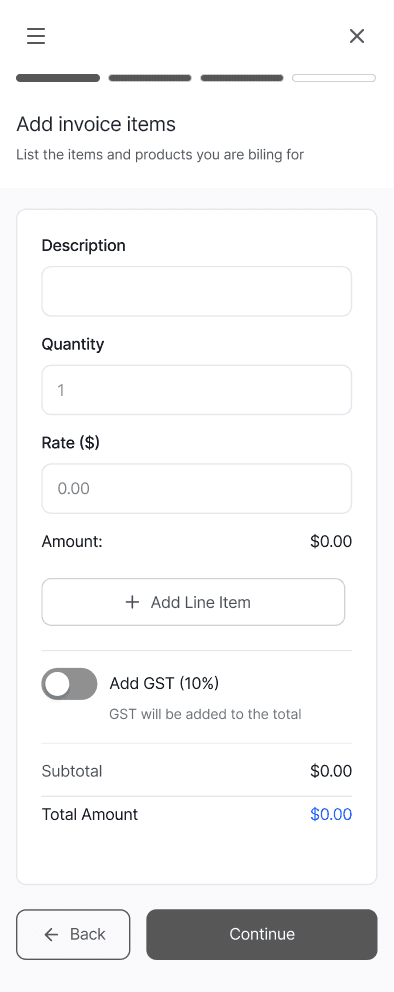
Another advantage was that, because invoice creation is already a long-form task, reducing an extra step helped keep the experience intuitive and manageable. This reduced the workflow from five steps to four and kept invoice creation focused on transaction-specific inputs.
Select customer
Invoice details
Add invoice items
Invoice preview
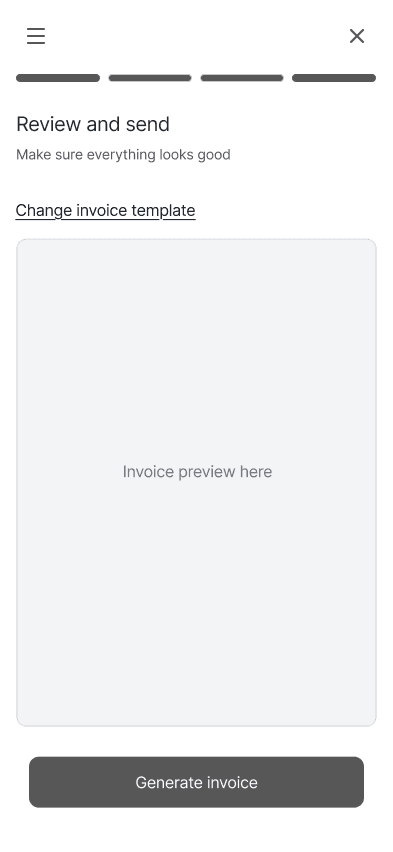
Payment setup relocated to business settings to reduce task interruption and improve flow momentum.
Optimising the end of the flow
Beyond restructuring the steps, I also focused on how the workflow concluded.
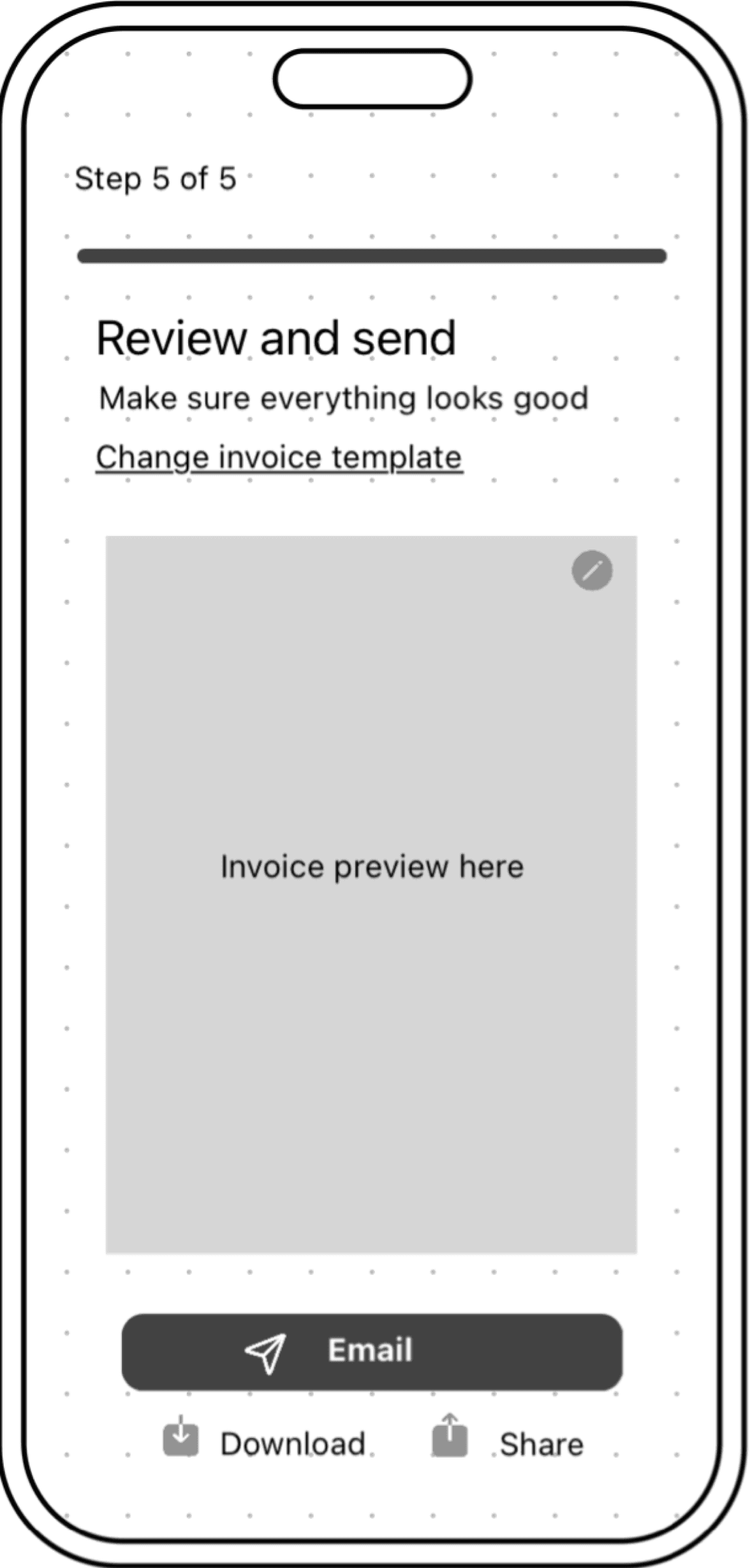
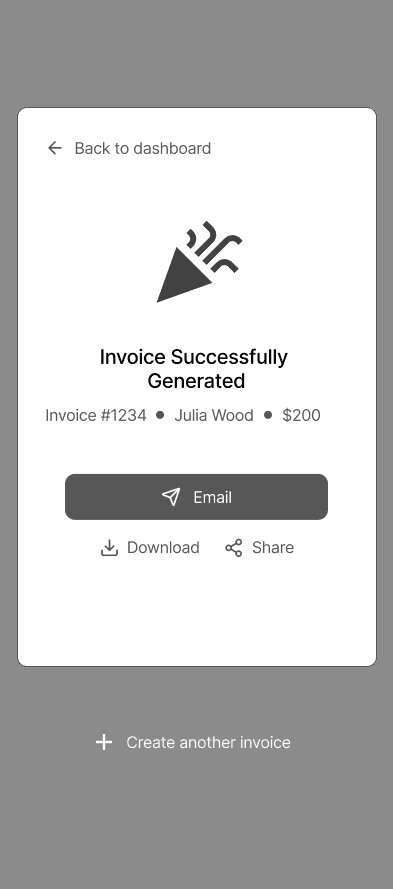
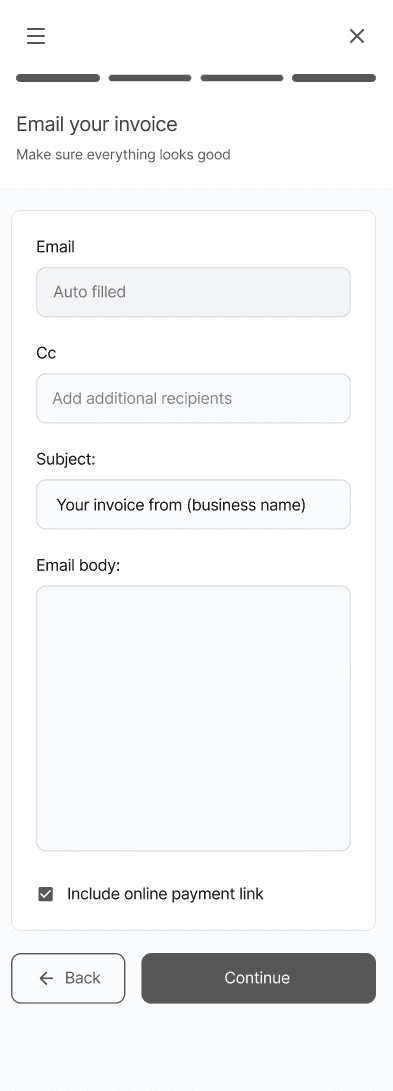
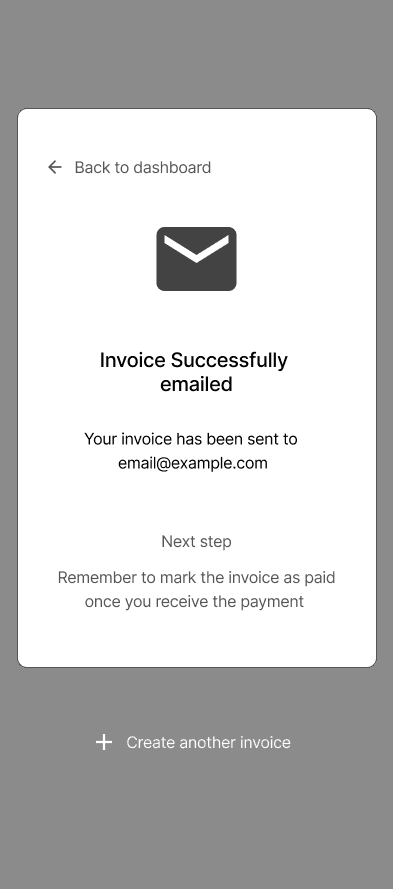
I proposed adding a direct email option within the final preview step, alongside share and PDF download functionality. Instead of simply generating an invoice, users could now complete the full task within the same flow — whether sending immediately, sharing externally, or downloading for later use. I also introduced a “Create another invoice” option at this stage, allowing users to begin a new invoice without breaking momentum.
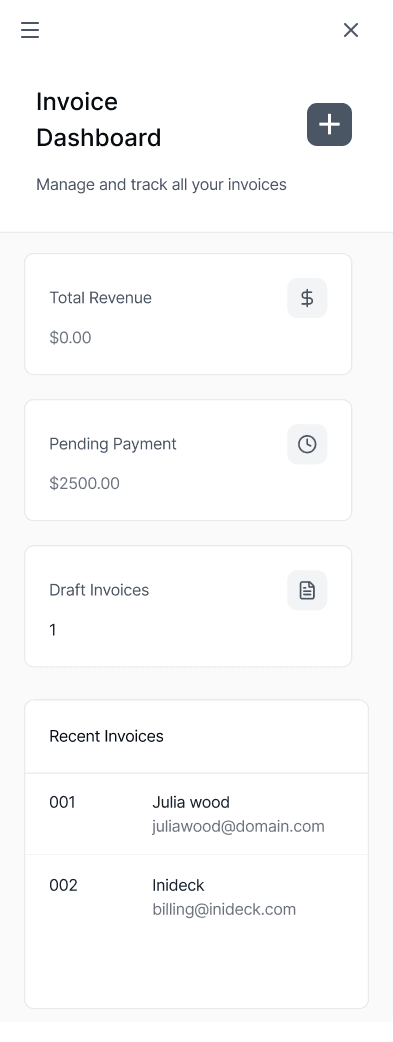
Generated invoices were saved to the dashboard by default, giving users flexibility to return and manage them according to their workflow. This flexibility was important, as different businesses operate differently.
Reducing friction in the most time intensive step
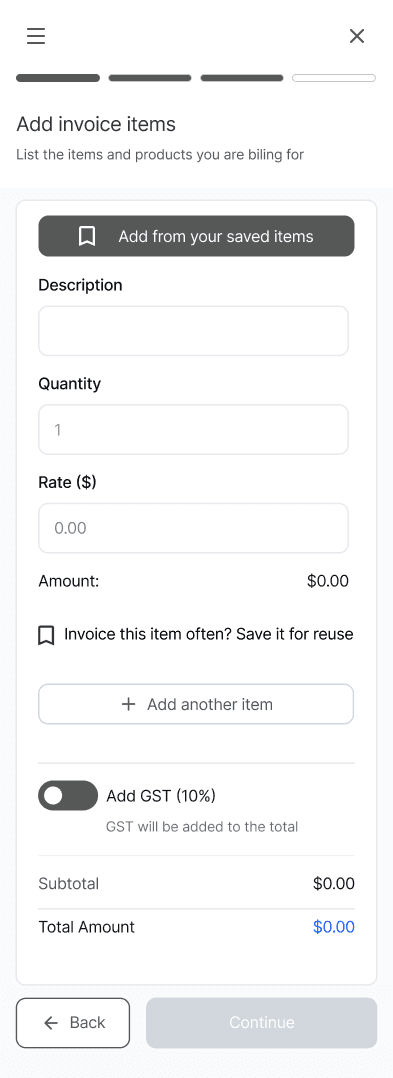
While simplifying the step structure improved overall flow, the most time-intensive part of invoice remained within the adding line item section.
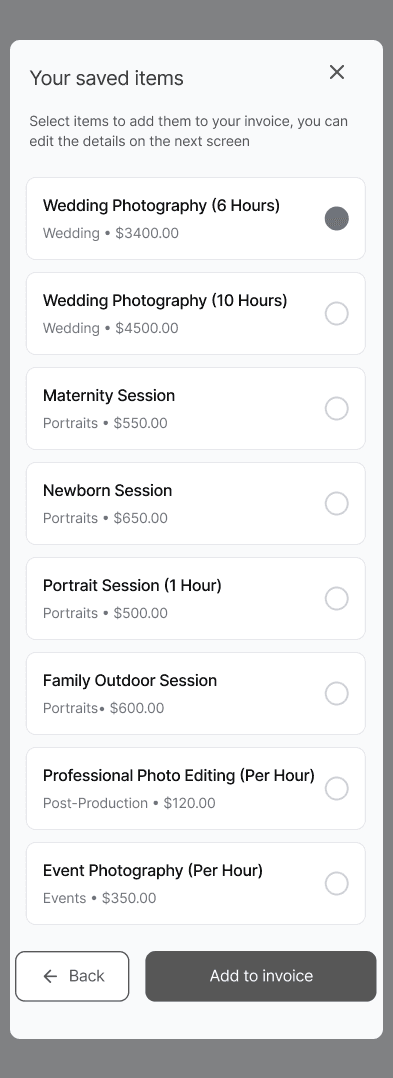
Through informal user conversations and early walkthroughs, it became clear that manually entering line items is time consuming. I spoke with several small business owners within my network to understand how they typically invoice, and many described repeatedly charging for the same services — such as plumbing call out fees, lessons, or standardised service packages.
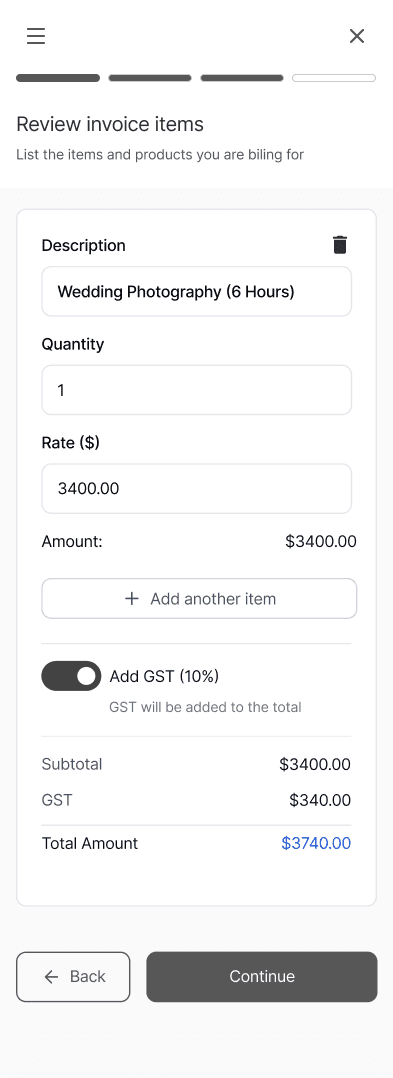
In the initial version, line items were entered manually for each invoice. To reduce repetitive input and better support recurring workflows, I introduced the ability for users to save frequently invoiced items. This allowed them to quickly select saved services instead of having to enter details each time.
Structuring the Experience
Refining the workflow
When I joined the team, the invoice flow had already been structured into five steps:
Select customer
Invoice details
Add invoice items
Select payment
Invoice preview
While each step of the invoice generator felt organised, I identified that separating payment selection into its own step was unnecessary within this flow. I suggested relocating payment options into the broader business setup settings. Users are unlikely to change their bank or payment details frequently, making it more of a recurring interruption than a meaningful step within the workflow.
Another advantage was that, because invoice creation is already a long-form task, reducing an extra step helped keep the experience intuitive and manageable. This reduced the workflow from five steps to four and kept invoice creation focused on transaction-specific inputs.
Select customer
Invoice details
Add invoice items
Invoice preview
Select customer
Invoice details
Add invoice items
Invoice preview
Payment setup relocated to business settings to reduce task interruption and improve flow momentum.
Optimising the end of the flow
Beyond restructuring the steps, I also focused on how the workflow concluded.
I proposed adding a direct email option within the final preview step, alongside share and PDF download functionality. Instead of simply generating an invoice, users could now complete the full task within the same flow — whether sending immediately, sharing externally, or downloading for later use. I also introduced a “Create another invoice” option at this stage, allowing users to begin a new invoice without breaking momentum.
Generated invoices were saved to the dashboard by default, giving users flexibility to return and manage them according to their workflow. This flexibility was important, as different businesses operate differently.
Reducing friction in the most time intensive step
While simplifying the step structure improved overall flow, the most time-intensive part of invoice remained within the adding line item section.
Through informal user conversations and early walkthroughs, it became clear that manually entering line items is time consuming. I spoke with several small business owners within my network to understand how they typically invoice, and many described repeatedly charging for the same services — such as plumbing call out fees, lessons, or standardised service packages.
In the initial version, line items were entered manually for each invoice. To reduce repetitive input and better support recurring workflows, I introduced the ability for users to save frequently invoiced items. This allowed them to quickly select saved services instead of having to enter details each time.
Working with constraints
The best product decisions are not always about adding features, but knowning when to simplify
Because the invoice form relied on real-time calculations and dynamic updates, certain interactions needed to be simplified to maintain performance across desktop and mobile. In particular, the line item section required careful structuring to avoid lag or unnecessary system complexity.
These trade-offs required close collaboration with engineering to ensure the workflow remained responsive while still meeting user needs.
Optimising the end of the flow
Beyond restructuring the steps, I also focused on how the workflow concluded.
I proposed adding a direct email option within the final preview step, alongside share and PDF download functionality. Instead of simply generating an invoice, users could now complete the full task within the same flow — whether sending immediately, sharing externally, or downloading for later use. I also introduced a “Create another invoice” option at this stage, allowing users to begin a new invoice without breaking momentum.
Generated invoices were saved to the dashboard by default, giving users flexibility to return and manage them according to their workflow. This flexibility was important, as different businesses operate differently.
The visuals shown throughout this case study represent wireframes developed during the MVP phase of the product. While not final UI, these artefacts guided implementation decisions and continue to evolve alongside the broader platform.
Key learnings
Designing within real-world constraints
Working within an early-stage product environment strengthened my ability to make confident trade-offs, prioritise effectively, and design for implementation rather than idealised solutions.
Small structural changes can significantly improve task momentum and completion.
System elements do not need to stay where they were originally placed if relocating them better supports user behaviour.
Even informal conversations with real users can uncover valuable insights that meaningfully reduce friction.
Good design requires balancing user experience with technical feasibility and performance realities.
Reducing friction in the most time intensive step
While simplifying the step structure improved overall flow, the most time-intensive part of invoice remained within the adding invoice item section.
Through informal user conversations and early walkthroughs, it became clear that manually entering line items is time-consuming. I spoke with several small business owners within my network to understand how they typically invoice, and many described repeatedly charging for the same services — such as plumbing call-out fees, lessons, or standardised service packages.
In the initial version, line items were entered manually for each invoice. To reduce repetitive input and better support recurring workflows, I introduced the ability for users to save frequently invoiced items. This allowed them to quickly select saved services instead of having to enter details each time.
Working with constraints
The best product decisions are not always about adding features, but knowning when to simplify
Because the invoice form relied on real-time calculations and dynamic updates, certain interactions needed to be simplified to maintain performance across desktop and mobile. In particular, the line item section required careful structuring to avoid lag or unnecessary system complexity.
These trade-offs required close collaboration with engineering to ensure the workflow remained responsive while still meeting user needs.
The visuals shown throughout this case study represent wireframes developed during the MVP phase of the product. While not final UI, these artefacts guided implementation decisions and continue to evolve alongside the broader platform.
Key learnings
Designing within real-world constraints
Working within an early-stage product environment strengthened my ability to make confident trade-offs, prioritise effectively, and design for implementation rather than idealised solutions.
Small structural changes can significantly improve task momentum and completion.
System elements do not need to stay where they were originally placed if relocating them better supports user behaviour.
Even informal conversations with real users can uncover valuable insights that meaningfully reduce friction.
Good design requires balancing user experience with technical feasibility and performance realities.
Yay! We've made it to the finish line. Say 👋 hi!
Designing a B2B Payment & Invoicing Experience (confidential)
Foundational workflow design in an early-stage SaaS startup.
Selected visuals and details have been simplified or adapted to respect confidentiality
INTRODUCTION
I joined an early-stage B2B SaaS startup during MVP definition, contributing to the foundational workflows that enable businesses to set up accounts, configure payments, manage customers, and generate invoices.
MY ROLE
As the UX designer responsible for core product workflows, I structured the platform’s end-to-end operational systems to support scalable MVP development.
My work spanned:
Business profile setup
Payment method configuration
Customer management
Invoice generation
Dashboard structure
Name check and domain registration exploration
[Project Scope]
Founder + 5 engineers + 1 UX
[Role]
UX Designer . Core Product Workflows
[Timeline]
November 2025 - present
INTRODUCTION
I joined an early-stage B2B SaaS startup during MVP definition, contributing to the foundational workflows that enable businesses to set up accounts, configure payments, manage customers, and generate invoices.
PRODUCT CONTEXT
Designing Across the Business Lifecycle
This product was designed to support businsses from day one, starting from setting up their online presence to managing ongoing operations.Rather than focusing on a single feature, the product experience was designed as an interconnected system supporting both initial setup and long-term retention.
My work contributed across these core systems; however, due to confidentiality considerations, the following sections focus on the invoice generation workflow as a representative example.
Case study focus
Acquisition
Establish Presence
Identity validation
Online presence setup
Retention
Manage Ongoing Operations
Payment Setup
Customer Management
Account setup
Invoice Generation
Dashboard
PRODUCT CONTEXT
Designing Across the Business Lifecycle
This product was designed to support businsses from day one, starting from setting up their online presence to managing ongoing operations.Rather than focusing on a single feature, the product experience was designed as an interconnected system supporting both initial setup and long-term retention.
My work contributed across these core systems; however, due to confidentiality considerations, the following sections focus on the invoice generation workflow as a representative example.
Case study focus
Retention
Manage Ongoing Operations
Payment Setup
Customer Management
Account setup
Invoice Generation
Dashboard
Acquisition
Establish Presence
Identity validation
Online presence setup
Retention
Manage Ongoing Operations
Payment Setup
Customer Management
Account setup
Dashboard
Invoice Generation
Case study focus
PRODUCT CONTEXT
Designing Across the Business Lifecycle
This product was designed to support businsses from day one, starting from setting up their online presence to managing ongoing operations. Rather than focusing on a single feature, the product experience was designed as an interconnected system supporting both initial setup and long-term retention.
My work contributed across these core systems; however, due to confidentiality considerations, the following sections focus on the invoice generation workflow as a representative example.
Case study focus
Hook
Establish Online Presence
Identity validation
Online presence setup
Retention
Manage Ongoing Operations
Payment Setup
Customer Management
Account setup
Invoice Generation
Dashboard
The challenge
Designing an invoice workflow that remains intuitive across devices while operating within real-world constraints.
Although invoice creation seems straightforward, the workflow requires handling dynamic form states, multiple line items, and flexible payment terms. As users entered information, parts of the form would shift and update, adding layers of complexity beneath what needed to feel like a simple task.
Because the experience is within a long, multi-step form, there was a real risk of overwhelm before completion. The challenge was to structure the information in a way that felt guided and manageable, while still supporting efficiency, edge cases, and consistent performance across desktop and mobile.
Structuring the Experience
Refining the workflow
When I joined the team, the invoice flow had already been structured into five steps:
Select customer
Invoice details
Add invoice items
Select payment
Invoice preview
Structuring the Experience
Refining the workflow
When I joined the team, the invoice flow had already been structured into five steps:
Select customer
Invoice details
Add invoice items
Select payment
Invoice preview
While each step of the invoice generator felt organised, I identified that separating payment selection into its own step was unnecessary within this flow. I suggested relocating payment options into the broader business setup settings. Users are unlikely to change their bank or payment details frequently, making it more of a recurring interruption than a meaningful step within the workflow.
Another advantage was that, because invoice creation is already a long-form task, reducing an extra step helped keep the experience intuitive and manageable. This reduced the workflow from five steps to four and kept invoice creation focused on transaction-specific inputs.
Select customer
Invoice details
Add invoice items
Invoice preview
Payment setup relocated to business settings to reduce task interruption and improve flow momentum.
Optimising the end of the flow
Beyond restructuring the steps, I also focused on how the workflow concluded.
I proposed adding a direct email option within the final preview step, alongside share and PDF download functionality. Instead of simply generating an invoice, users could now complete the full task within the same flow — whether sending immediately, sharing externally, or downloading for later use. I also introduced a “Create another invoice” option at this stage, allowing users to begin a new invoice without breaking momentum.
Generated invoices were saved to the dashboard by default, giving users flexibility to return and manage them according to their workflow. This flexibility was important, as different businesses operate differently.
Reducing friction in the most time intensive step
While simplifying the step structure improved overall flow, the most time-intensive part of invoice remained within the adding line item section.
Through informal user conversations and early walkthroughs, it became clear that manually entering line items is time consuming. I spoke with several small business owners within my network to understand how they typically invoice, and many described repeatedly charging for the same services — such as plumbing call out fees, lessons, or standardised service packages.
In the initial version, line items were entered manually for each invoice. To reduce repetitive input and better support recurring workflows, I introduced the ability for users to save frequently invoiced items. This allowed them to quickly select saved services instead of having to enter details each time.
Structuring the Experience
Refining the workflow
When I joined the team, the invoice flow had already been structured into five steps:
Select customer
Invoice details
Add invoice items
Select payment
Invoice preview
While each step of the invoice generator felt organised, I identified that separating payment selection into its own step was unnecessary within this flow. I suggested relocating payment options into the broader business setup settings. Users are unlikely to change their bank or payment details frequently, making it more of a recurring interruption than a meaningful step within the workflow.
Another advantage was that, because invoice creation is already a long-form task, reducing an extra step helped keep the experience intuitive and manageable. This reduced the workflow from five steps to four and kept invoice creation focused on transaction-specific inputs.
Select customer
Invoice details
Add invoice items
Invoice preview
Select customer
Invoice details
Add invoice items
Invoice preview
Payment setup relocated to business settings to reduce task interruption and improve flow momentum.
Optimising the end of the flow
Beyond restructuring the steps, I also focused on how the workflow concluded.
I proposed adding a direct email option within the final preview step, alongside share and PDF download functionality. Instead of simply generating an invoice, users could now complete the full task within the same flow — whether sending immediately, sharing externally, or downloading for later use. I also introduced a “Create another invoice” option at this stage, allowing users to begin a new invoice without breaking momentum.
Generated invoices were saved to the dashboard by default, giving users flexibility to return and manage them according to their workflow. This flexibility was important, as different businesses operate differently.
Reducing friction in the most time intensive step
While simplifying the step structure improved overall flow, the most time-intensive part of invoice remained within the adding line item section.
Through informal user conversations and early walkthroughs, it became clear that manually entering line items is time consuming. I spoke with several small business owners within my network to understand how they typically invoice, and many described repeatedly charging for the same services — such as plumbing call out fees, lessons, or standardised service packages.
In the initial version, line items were entered manually for each invoice. To reduce repetitive input and better support recurring workflows, I introduced the ability for users to save frequently invoiced items. This allowed them to quickly select saved services instead of having to enter details each time.
Working with constraints
The best product decisions are not always about adding features, but knowning when to simplify
Because the invoice form relied on real-time calculations and dynamic updates, certain interactions needed to be simplified to maintain performance across desktop and mobile. In particular, the line item section required careful structuring to avoid lag or unnecessary system complexity.
These trade-offs required close collaboration with engineering to ensure the workflow remained responsive while still meeting user needs.
Optimising the end of the flow
Beyond restructuring the steps, I also focused on how the workflow concluded.
I proposed adding a direct email option within the final preview step, alongside share and PDF download functionality. Instead of simply generating an invoice, users could now complete the full task within the same flow — whether sending immediately, sharing externally, or downloading for later use. I also introduced a “Create another invoice” option at this stage, allowing users to begin a new invoice without breaking momentum.
Generated invoices were saved to the dashboard by default, giving users flexibility to return and manage them according to their workflow. This flexibility was important, as different businesses operate differently.
The visuals shown throughout this case study represent wireframes developed during the MVP phase of the product. While not final UI, these artefacts guided implementation decisions and continue to evolve alongside the broader platform.
Key learnings
Designing within real-world constraints
Working within an early-stage product environment strengthened my ability to make confident trade-offs, prioritise effectively, and design for implementation rather than idealised solutions.
Small structural changes can significantly improve task momentum and completion.
System elements do not need to stay where they were originally placed if relocating them better supports user behaviour.
Even informal conversations with real users can uncover valuable insights that meaningfully reduce friction.
Good design requires balancing user experience with technical feasibility and performance realities.
Reducing friction in the most time intensive step
While simplifying the step structure improved overall flow, the most time-intensive part of invoice remained within the adding invoice item section.
Through informal user conversations and early walkthroughs, it became clear that manually entering line items is time-consuming. I spoke with several small business owners within my network to understand how they typically invoice, and many described repeatedly charging for the same services — such as plumbing call-out fees, lessons, or standardised service packages.
In the initial version, line items were entered manually for each invoice. To reduce repetitive input and better support recurring workflows, I introduced the ability for users to save frequently invoiced items. This allowed them to quickly select saved services instead of having to enter details each time.
Working with constraints
The best product decisions are not always about adding features, but knowning when to simplify
Because the invoice form relied on real-time calculations and dynamic updates, certain interactions needed to be simplified to maintain performance across desktop and mobile. In particular, the line item section required careful structuring to avoid lag or unnecessary system complexity.
These trade-offs required close collaboration with engineering to ensure the workflow remained responsive while still meeting user needs.
The visuals shown throughout this case study represent wireframes developed during the MVP phase of the product. While not final UI, these artefacts guided implementation decisions and continue to evolve alongside the broader platform.
Key learnings
Designing within real-world constraints
Working within an early-stage product environment strengthened my ability to make confident trade-offs, prioritise effectively, and design for implementation rather than idealised solutions.
Small structural changes can significantly improve task momentum and completion.
System elements do not need to stay where they were originally placed if relocating them better supports user behaviour.
Even informal conversations with real users can uncover valuable insights that meaningfully reduce friction.
Good design requires balancing user experience with technical feasibility and performance realities.
Yay! We've made it to the finish line. Say 👋 hi!
Designing a B2B Payment & Invoicing Experience (confidential)
Foundational workflow design in an early-stage SaaS startup.
Selected visuals and details have been simplified or adapted to respect confidentiality
INTRODUCTION
I joined an early-stage B2B SaaS startup during MVP definition, contributing to the foundational workflows that enable businesses to set up accounts, configure payments, manage customers, and generate invoices.
MY ROLE
As the UX designer responsible for core product workflows, I structured the platform’s end-to-end operational systems to support scalable MVP development.
My work spanned:
Business profile setup
Payment method configuration
Customer management
Invoice generation
Dashboard structure
Name check and domain registration exploration
[Project Scope]
Founder + 5 engineers + 1 UX
[Role]
UX Designer . Core Product Workflows
[Timeline]
November 2025 - present
INTRODUCTION
I joined an early-stage B2B SaaS startup during MVP definition, contributing to the foundational workflows that enable businesses to set up accounts, configure payments, manage customers, and generate invoices.
PRODUCT CONTEXT
Designing Across the Business Lifecycle
This product was designed to support businsses from day one, starting from setting up their online presence to managing ongoing operations.Rather than focusing on a single feature, the product experience was designed as an interconnected system supporting both initial setup and long-term retention.
My work contributed across these core systems; however, due to confidentiality considerations, the following sections focus on the invoice generation workflow as a representative example.
Case study focus
Acquisition
Establish Presence
Identity validation
Online presence setup
Retention
Manage Ongoing Operations
Payment Setup
Customer Management
Account setup
Invoice Generation
Dashboard
PRODUCT CONTEXT
Designing Across the Business Lifecycle
This product was designed to support businsses from day one, starting from setting up their online presence to managing ongoing operations.Rather than focusing on a single feature, the product experience was designed as an interconnected system supporting both initial setup and long-term retention.
My work contributed across these core systems; however, due to confidentiality considerations, the following sections focus on the invoice generation workflow as a representative example.
Case study focus
Retention
Manage Ongoing Operations
Payment Setup
Customer Management
Account setup
Invoice Generation
Dashboard
Acquisition
Establish Presence
Identity validation
Online presence setup
Retention
Manage Ongoing Operations
Payment Setup
Customer Management
Account setup
Dashboard
Invoice Generation
Case study focus
PRODUCT CONTEXT
Designing Across the Business Lifecycle
This product was designed to support businsses from day one, starting from setting up their online presence to managing ongoing operations. Rather than focusing on a single feature, the product experience was designed as an interconnected system supporting both initial setup and long-term retention.
My work contributed across these core systems; however, due to confidentiality considerations, the following sections focus on the invoice generation workflow as a representative example.
Case study focus
Hook
Establish Online Presence
Identity validation
Online presence setup
Retention
Manage Ongoing Operations
Payment Setup
Customer Management
Account setup
Invoice Generation
Dashboard
The challenge
Designing an invoice workflow that remains intuitive across devices while operating within real-world constraints.
Although invoice creation seems straightforward, the workflow requires handling dynamic form states, multiple line items, and flexible payment terms. As users entered information, parts of the form would shift and update, adding layers of complexity beneath what needed to feel like a simple task.
Because the experience is within a long, multi-step form, there was a real risk of overwhelm before completion. The challenge was to structure the information in a way that felt guided and manageable, while still supporting efficiency, edge cases, and consistent performance across desktop and mobile.
Structuring the Experience
Refining the workflow
When I joined the team, the invoice flow had already been structured into five steps:
Select customer
Invoice details
Add invoice items
Select payment
Invoice preview
Structuring the Experience
Refining the workflow
When I joined the team, the invoice flow had already been structured into five steps:
Select customer
Invoice details
Add invoice items
Select payment
Invoice preview
While each step of the invoice generator felt organised, I identified that separating payment selection into its own step was unnecessary within this flow. I suggested relocating payment options into the broader business setup settings. Users are unlikely to change their bank or payment details frequently, making it more of a recurring interruption than a meaningful step within the workflow.
Another advantage was that, because invoice creation is already a long-form task, reducing an extra step helped keep the experience intuitive and manageable. This reduced the workflow from five steps to four and kept invoice creation focused on transaction-specific inputs.
Select customer
Invoice details
Add invoice items
Invoice preview
Payment setup relocated to business settings to reduce task interruption and improve flow momentum.
Optimising the end of the flow
Beyond restructuring the steps, I also focused on how the workflow concluded.
I proposed adding a direct email option within the final preview step, alongside share and PDF download functionality. Instead of simply generating an invoice, users could now complete the full task within the same flow — whether sending immediately, sharing externally, or downloading for later use. I also introduced a “Create another invoice” option at this stage, allowing users to begin a new invoice without breaking momentum.
Generated invoices were saved to the dashboard by default, giving users flexibility to return and manage them according to their workflow. This flexibility was important, as different businesses operate differently.
Reducing friction in the most time intensive step
While simplifying the step structure improved overall flow, the most time-intensive part of invoice remained within the adding line item section.
Through informal user conversations and early walkthroughs, it became clear that manually entering line items is time consuming. I spoke with several small business owners within my network to understand how they typically invoice, and many described repeatedly charging for the same services — such as plumbing call out fees, lessons, or standardised service packages.
In the initial version, line items were entered manually for each invoice. To reduce repetitive input and better support recurring workflows, I introduced the ability for users to save frequently invoiced items. This allowed them to quickly select saved services instead of having to enter details each time.
Structuring the Experience
Refining the workflow
When I joined the team, the invoice flow had already been structured into five steps:
Select customer
Invoice details
Add invoice items
Select payment
Invoice preview
While each step of the invoice generator felt organised, I identified that separating payment selection into its own step was unnecessary within this flow. I suggested relocating payment options into the broader business setup settings. Users are unlikely to change their bank or payment details frequently, making it more of a recurring interruption than a meaningful step within the workflow.
Another advantage was that, because invoice creation is already a long-form task, reducing an extra step helped keep the experience intuitive and manageable. This reduced the workflow from five steps to four and kept invoice creation focused on transaction-specific inputs.
Select customer
Invoice details
Add invoice items
Invoice preview
Select customer
Invoice details
Add invoice items
Invoice preview
Payment setup relocated to business settings to reduce task interruption and improve flow momentum.
Optimising the end of the flow
Beyond restructuring the steps, I also focused on how the workflow concluded.
I proposed adding a direct email option within the final preview step, alongside share and PDF download functionality. Instead of simply generating an invoice, users could now complete the full task within the same flow — whether sending immediately, sharing externally, or downloading for later use. I also introduced a “Create another invoice” option at this stage, allowing users to begin a new invoice without breaking momentum.
Generated invoices were saved to the dashboard by default, giving users flexibility to return and manage them according to their workflow. This flexibility was important, as different businesses operate differently.
Reducing friction in the most time intensive step
While simplifying the step structure improved overall flow, the most time-intensive part of invoice remained within the adding line item section.
Through informal user conversations and early walkthroughs, it became clear that manually entering line items is time consuming. I spoke with several small business owners within my network to understand how they typically invoice, and many described repeatedly charging for the same services — such as plumbing call out fees, lessons, or standardised service packages.
In the initial version, line items were entered manually for each invoice. To reduce repetitive input and better support recurring workflows, I introduced the ability for users to save frequently invoiced items. This allowed them to quickly select saved services instead of having to enter details each time.
Working with constraints
The best product decisions are not always about adding features, but knowning when to simplify
Because the invoice form relied on real-time calculations and dynamic updates, certain interactions needed to be simplified to maintain performance across desktop and mobile. In particular, the line item section required careful structuring to avoid lag or unnecessary system complexity.
These trade-offs required close collaboration with engineering to ensure the workflow remained responsive while still meeting user needs.
Optimising the end of the flow
Beyond restructuring the steps, I also focused on how the workflow concluded.
I proposed adding a direct email option within the final preview step, alongside share and PDF download functionality. Instead of simply generating an invoice, users could now complete the full task within the same flow — whether sending immediately, sharing externally, or downloading for later use. I also introduced a “Create another invoice” option at this stage, allowing users to begin a new invoice without breaking momentum.
Generated invoices were saved to the dashboard by default, giving users flexibility to return and manage them according to their workflow. This flexibility was important, as different businesses operate differently.
The visuals shown throughout this case study represent wireframes developed during the MVP phase of the product. While not final UI, these artefacts guided implementation decisions and continue to evolve alongside the broader platform.
Key learnings
Designing within real-world constraints
Working within an early-stage product environment strengthened my ability to make confident trade-offs, prioritise effectively, and design for implementation rather than idealised solutions.
Small structural changes can significantly improve task momentum and completion.
System elements do not need to stay where they were originally placed if relocating them better supports user behaviour.
Even informal conversations with real users can uncover valuable insights that meaningfully reduce friction.
Good design requires balancing user experience with technical feasibility and performance realities.
Reducing friction in the most time intensive step
While simplifying the step structure improved overall flow, the most time-intensive part of invoice remained within the adding invoice item section.
Through informal user conversations and early walkthroughs, it became clear that manually entering line items is time-consuming. I spoke with several small business owners within my network to understand how they typically invoice, and many described repeatedly charging for the same services — such as plumbing call-out fees, lessons, or standardised service packages.
In the initial version, line items were entered manually for each invoice. To reduce repetitive input and better support recurring workflows, I introduced the ability for users to save frequently invoiced items. This allowed them to quickly select saved services instead of having to enter details each time.
Working with constraints
The best product decisions are not always about adding features, but knowning when to simplify
Because the invoice form relied on real-time calculations and dynamic updates, certain interactions needed to be simplified to maintain performance across desktop and mobile. In particular, the line item section required careful structuring to avoid lag or unnecessary system complexity.
These trade-offs required close collaboration with engineering to ensure the workflow remained responsive while still meeting user needs.
The visuals shown throughout this case study represent wireframes developed during the MVP phase of the product. While not final UI, these artefacts guided implementation decisions and continue to evolve alongside the broader platform.
Key learnings
Designing within real-world constraints
Working within an early-stage product environment strengthened my ability to make confident trade-offs, prioritise effectively, and design for implementation rather than idealised solutions.
Small structural changes can significantly improve task momentum and completion.
System elements do not need to stay where they were originally placed if relocating them better supports user behaviour.
Even informal conversations with real users can uncover valuable insights that meaningfully reduce friction.
Good design requires balancing user experience with technical feasibility and performance realities.
Yay! We've made it to the finish line. Say 👋 hi!